Which podcast apps support video?

Video files have been supported since the beginning of podcasting; even by Apple Podcasts, which once used to have a video section in the app (see a button for a video chart in a screenshot from 2015).
And, video files haven’t gone away. The Podcast Index currently (as of Dec 2025) contains 113,597 open RSS video podcasts - 94% of which use .mp4 files. (We tested that using the newestEnclosureUrl - the filename of the latest episode posted). That’s 2.3% of all the podcasts in the index.
But - where can you play these video podcasts? What apps truly support them?
What we tested
There are lots of apps out there, so to avoid testing hundreds of the things, we went through the top apps visible in OP3 for the Podnews Weekly Review. The percentages shown in the list below are December’s download numbers for this podcast. We tested all apps with more than 0.5% of playback. (Spotify always does poorly for “podcasts about podcasts”, but it’s there.)
We tested using This Week in Tech (Video) - which has a 1.36 GB downloadable video file in it, using .mp4. The video is 30fps 1920x1080 H264, with AAC audio. It’s a big file: worth noting that all the apps that supported video appeared to start playing before the full file had downloaded. We tested the majority of apps on iPhone, some Android-only apps on Android, and TrueFans on web.
What we found
✅❓ Apple Podcasts (iPhone) (43%)
You can find This Week in Tech (Video) in the Apple Podcasts directory.
All episodes are marked as “video” in the epsiode list.
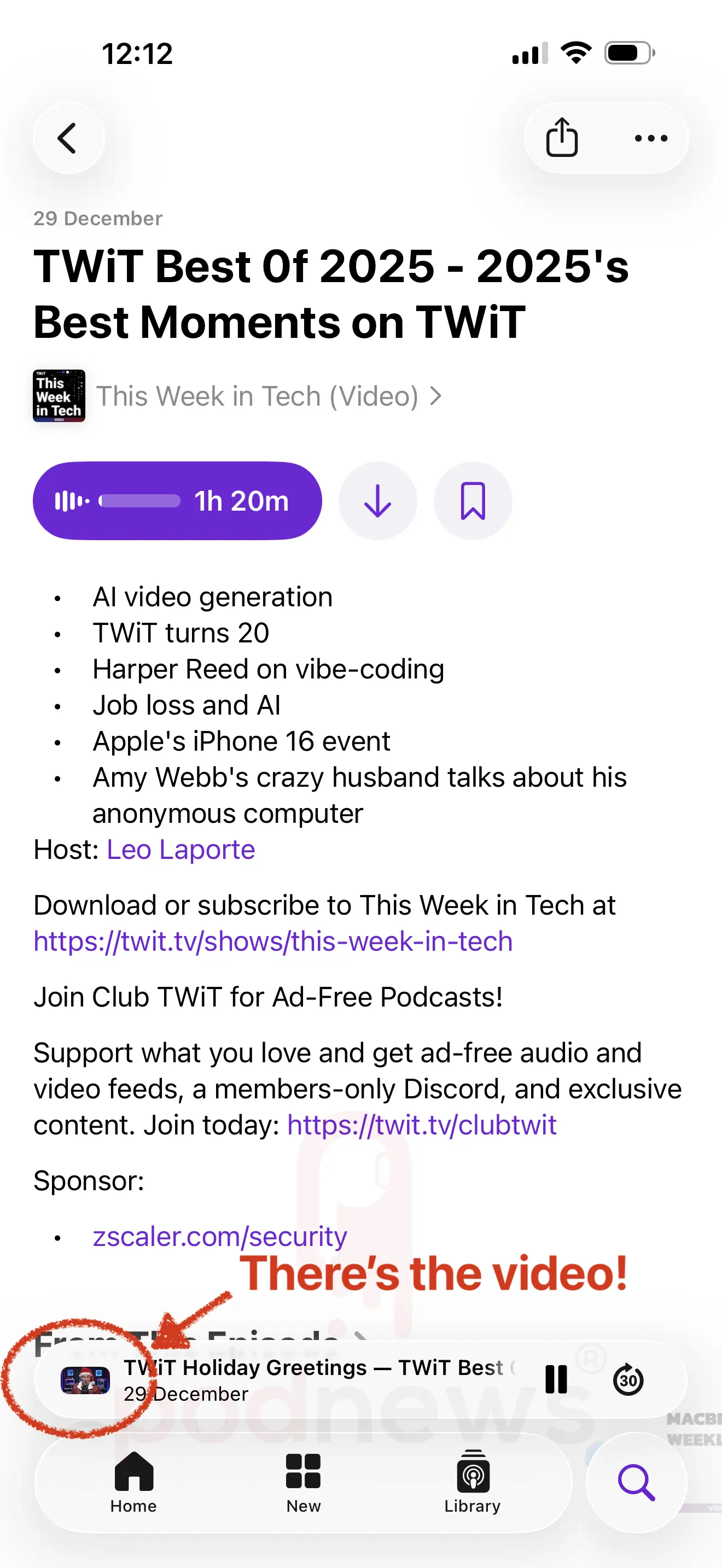
When you hit “play”, the video plays: but in place of the thumbnail in the player at the bottom of the screen, making it almost impossible to recognise that you have found a video podcast. Here’s the size of the video. You have to open the player up to see video playing larger than a pinhead.
Once you’ve opened the player, you can turn your iPhone on its side to watch fullscreen.
Is this full video support? Undoubtedly, Apple Podcasts plays video: but you have to really know what you’re doing, because the player doesn’t open automatically. That results in a video window that in our tests (using an iPhone 16 Pro Max) was less than a tenth of an inch high. Keeping the video essentially hidden, with a further click-away from playback, isn’t a great user experience in our view.
❌ Overcast (iPhone) (35%)
You can find This Week in Tech (Video) in the Overcast directory.
All episodes appear greyed-out, and when you choose an episode to watch, there is no play button.
Update: An earlier version of this article didn’t realise you have to add episodes manually (uniquely for a podcast app) - so once we did that, you can hit play. For us, it played one second of the audio track, then sat with a “spinner” on the screen. We’re told it should play the audio track (only), but it didn’t even do that for us. Even when the file had loaded completely, it wouldn’t play further.
✅ Pocket Casts (iPhone) (5.9%)
You can find This Week in Tech (Video) in the Pocket Casts directory.
All episodes have a blue video button next to them, indicating that this is a video podcast.
Pressing “play” opens the player window and plays the video.
Tapping on the video makes it full-screen, from where you can turn your iPhone on its side to fill the screen with the video. The player also lets you fill the screen entirely. There’s a Chromecast icon, but touching it doesn’t do anything.
❌ iHeartRadio (iPhone) (3.4%)
Note: we have the Australian version v10.59.0, which is roughly the same as the version available in the US, we believe.
You can find This Week in Tech (Video) in the iHeartRadio directory.
Apart from its title, there is nothing to indicate that this is a video podcast.
Pressing “play” opens the player window and plays the audio only, accompanied by a cropped thumbnail. There appears to be no way of playing the video.
✅ 😕 Spotify (iPhone) (2.5%)
You can find This Week in Tech (Video) in the Spotify directory. It appears separate to the audio feed - this is presumably to allow the regular audio version to correctly pass-through for monetisation purposes.
Apart from its title, there’s nothing to indicate that this is a video podcast.
Pressing “play” opens the player window and plays the video.
Note: this video is not from the RSS feed - the video has to be uploaded separately. The average user doesn’t really care about that, so for the purposes of this test, we give it a green tick, but we don’t feel great about it.
❌ Fountain (iPhone) (1.3%)
You can find This Week in Tech (Video) in the Fountain directory.
Apart from its title, there’s nothing to indicate that this is a video podcast.
Pressing “play” starts only playing the audio of the podcast, accompanied by a cropped thumbnail. You can open the player fully, but it still only plays the audio. There appears to be no way of playing the video.
Fountain supports HLS video streaming using the alternateEnclosure; but doesn’t appear to support standard video playback.
✅ TrueFans (web/Safari) (1.2%)
You can find This Week in Tech (Video) in the TrueFans directory.
Episodes are marked with a video icon.
Pressing “play” starts the playback of the video in a playback overlay on the website. You can make it full-screen or pop-out the video.
❌ Castamatic (iPhone) (0.99%)
You can find This Week in Tech (Video) in the Castamatic directory.
No episodes appear in the episodes list. There appears to be no way of playing the show at all.
❌ Podcast Guru (iPhone) (0.99%)
You can find This Week in Tech (Video) in the Podcast Guru directory.
Apart from its title, there’s nothing to indicate that this is a video podcast.
Pressing “play” starts only playing the audio of the podcast, accompanied by a 16:9 thumbnail. There appears to be no way of playing the video.
✅ Podcast Addict (Android) (0.76%)
You can find This Week in Tech (Video) in the Podcast Addict directory.
Apart from its title, there’s nothing to indicate that this is a video podcast.
Pressing “play” starts playing the video of the podcast, in full-screen (albeit stretched to fill the screen rather than in 16:9 aspect ratio).
✅ AntennaPod (Android) (0.52%)
You can find This Week in Tech (Video) in the AntennaPod directory.
Apart from its title, there’s nothing to indicate that this is a video podcast.
Pressing “play” starts playing the video of the podcast in a playback window.
Additionally…
YouTube Music plays RSS feeds, so following the link in our directory we thought we’d give it a go. Amusingly, or perhaps on purpose, YouTube Music does not play RSS video podcasts. So, er, no. Though, of course, YouTube and YouTube Music itself plays video separately from RSS.
In conclusion
Only for 9% of downloads would someone get the video visible on the screen when they hit 'play’. Just 9%.
For 46% of downloads, video isn’t playable at all.
And while 45.5% of downloads will play the video, those apps either aren’t playing it from RSS, or don’t put the video front and centre of the experience.
Podcast app developers have a choice - to support video podcasting as a first-class citizen, or, lose those that prefer video to proprietary solutions like Spotify or YouTube.
What’s next for video podcasting?
Spotify and YouTube allow podcasters to upload their shows, in video, to their servers. That’s not using open RSS - so, specifically, what might change here for people using RSS for their video podcast?
One feed is better than two
All the way through the test above we had to choose between “This Week In Tech (Audio)” and “This Week In Tech (Video)”. The audio version is published in a different feed to the video version.
Two feeds for the same content isn’t good for anyone - it’s a poor user experience, but it’s also bad for algorithms. Anyone choosing This Week In Tech (video) is not choosing This Week In Tech (audio), and therefore both suffer in an apparent loss of popularity when compared to other shows that only have one feed.
The solution for this is the alternateEnclosure tag, which would let podcasters put both audio and video files in the same RSS feed. That would allow a default of the audio version (which would work for everyone); but also allow people to use a “switch to video” button to show the video version. All in the same feed.
More than one video file is better than one
With one downloadable file, you’re stuck with whatever the creator has given you. That’s great for audio - but less good for video.
Apple Podcasts accepts up to 4K files, but it’s pointless playing back a 4K file on an iPhone - the screen isn’t good enough for that, and it would be a massive file to keep on your phone. Ideally, we’d have a 1080p file - but if there’s only one to choose, tough.
This video podcast for example (it’s not listed in Apple Podcasts) is just a 576p (“SD”) video file. No access here to a 1080p version, or any better - so if there’s only one to choose, it’ll just look a bit smeary on your 4K telly.
No - better to offer a few different files, so your device can choose the right one. The solution for this is, once more, the alternateEnclosure tag, which allows multiple formats and filesizes.
Not downloading a massive file is good too
1.36 GB for one episode is a lot for your phone to deal with, and most of us don’t have the space. But, given most podcasts are consumed while at home or within wifi range, why not - instead of downloading the whole lot - just stream?
That’s what HLS is built for: allowing podcasters to stream video without a massive download. It’s an Apple invention; but Apple Podcasts doesn’t use it - yet.
However, HLS playlists - which can also automatically deliver different bitrates and formats - also fit into the alternateEnclosure tag, allowing a capable podcast app to choose a stream rather than a download if it makes more sense.
Who supports the alternateEnclosure tag?
A few apps already do, after the Podcast Standard Project did some work on HLS video. They’re not, yet, mainstream; but the more that supports this, the better.
Now, all we need is for Apple Podcasts to support the alternateEnclosure tag.
And, to be fair, for Overcast to support video at all.