Why You Should Be Using Podcast Chapters


Chapters have a long history in podcasting. They were available in the early days of iTunes through “Enhanced AAC” media encoded in .m4a files. Now, chapters are a commonly accepted standard in either MP3 embedded metadata or external JSON-structured data via the Podcasting 2.0 standard.
What are chapters?
Simply put, a podcast chapter is a way to present extra information at a specific time within an episode. Specifically, this time-stamped data can include up to three pieces of information in the core standard of podcast chapters:
- Title
- Optional image
- Optional URL
The Podcasting 2.0 standard adds two more optional features: geographic location and a toggle for table of contents. Hiding a chapter from the table of contents allows that chapter to be visible and actionable only during its timestamp range, but hidden from the chapter outline view or and not able to be skipped to within the podcast app.
These chapters are then displayed within podcast apps in primarily two contexts:
- While the episode is playing, the chapters will change as their timestamps are reached, and the chapter will typically remain until the next chapter.
- Most podcast apps that use chapters will also allow you to view the entire outline of chapters, making it easy to skip around as you wish or to simply see an overview of the episode’s contents.
Podcast chapters improve understanding and retention
By dividing your content into clearly labeled chapters, it’s similar to a public speaker handing out a printed outline for his or her presentation. It allows you to follow along with the immediate context as the person is speaking, or you can review past points without having to skip back, or you can see where the content is going.
Yes, offering podcast chapters means that audiences could skip content, but I will address that concern in a later point below.
Podcast chapters bring visual enhancement to audio episodes
Because each chapter can optionally contain an image, you could use that to enhance the experience for your listening audience by adding a visual layer to an audio podcast.
For example:
- Developers could use images to show code or demonstrate user interface (UI) concepts.
- Photographers, travelers, and journalists could display the photos that accompany their stories.
- Fan-content podcasts could display screenshots of the scenes or things they’re discussing.
- Educators could use images to display quotations, graphs, maps, Scriptures, equations, and other important textual or visual context.
Anything that can be put in a square image could be displayed in a podcast chapter!
Podcasting 2.0 chapters could even support inclusion of animated GIFs or small videos (limited support in podcast apps).
Podcast chapters make calls to action easily actionable
Adding a URL to a chapter will turn it into a hyperlink, making that link prominent and actionable exactly when it is most relevant.
Instead of telling your audience to use a link buried in your episode notes or speaking the URL in your episode, you could present that link through a chapter for the entire duration that you’re actually talking about the thing. This makes it significantly easier for your audience to open that link and take action.
You could use this for:
- Ads or sponsors
- Affiliate links
- Internal promotions
- Upcoming events
- Email, phone, or SMS contact (using the appropriate URL schemas, such as
mailto:feedback@example.com) - External recommendations
Because the chapter can use any valid URL, including alternate URL schemas, it could link to anything you want: visiting a website, calling a phone number, deep-linking to another app, opening an app or media store, even sending an email with a prefilled subject and message body.
Podcast chapters allow audiences to get what they want from you
Some podcasters dislike chapters because it allows their audiences to skip content. While that’s true, it’s also a good thing because it’s so much better to enable your audience to get the content they want from you than frustrating them and causing them to abandon the episode and maybe even your whole podcast.
This also makes it a lot easier for your audience to find and jump back to content they want again. That could be to review a prior point, or maybe even finding a specific piece of content across your entire archive.
Won’t chapters let audiences skip ads?
If your main objection to using chapters in your podcast is that it would allow your audience to skip your ads, I have a newsflash for you: your audience is already skipping ads. So skipping can’t be prevented.
However, look at chapters as a way of making your ads actually much better! Instead of merely talking about the thing being promoted, you could use a chapter to show it—especially with extra context like the coupon code your audience needs to use.
And even better than that, you can use the chapter to present the relevant link during that ad spot, enabling your audience to visit the sponsor with a simple tap while you’re talking about it.
And using Podcasting 2.0 chapters, you could update that chapter title, image, and URL whenever you need.
Thus, chapters actually make ads better for audiences!
And if you still don’t want your ads to be visible in the outline, then here’s a 2-step trick that works in modern podcast apps that fully support the Podcasting 2.0 standard for chapters:
- Create the chapter for your ad, but set it to not appear in the table of contents (the JSON would be
"toc": false). - If your ad is in the middle of a chapter (not between chapters or topic changes), duplicate the chapter before the ad, but set the duplicate to also be hidden from the table of contents.
This would make the list of chapters look like this in your metadata:
- Chapter 1: Introduction
- Chapter 2 (hidden): Sponsor
- Chapter 3 (hidden): Introduction
- Chapter 4: Topic A
But to your audience in a modern podcast app, they should see the chapters like this:
- Chapter 1: Introduction
- Chapter 2: Topic A
How to chapter your podcast episodes
The two most-supported chapter formats are legacy chapters embedded in MP3 files, and modern Podcasting 2.0 chapters hosted in an external metadata file (in JSON format) linked from your RSS feed.
The first place to look for adding chapters to your podcast is in your current publishing tool or podcast-hosting provider. For example, Captivate, Buzzsprout, Transistor, and Blubrry’s PowerPress plugin for WordPress all contain built-in features to add chapters to your episodes. These tools range in features and usability. Some tools will even offer AI-suggested chapters for you. So check with your podcast-hosting provider or publishing tool first.
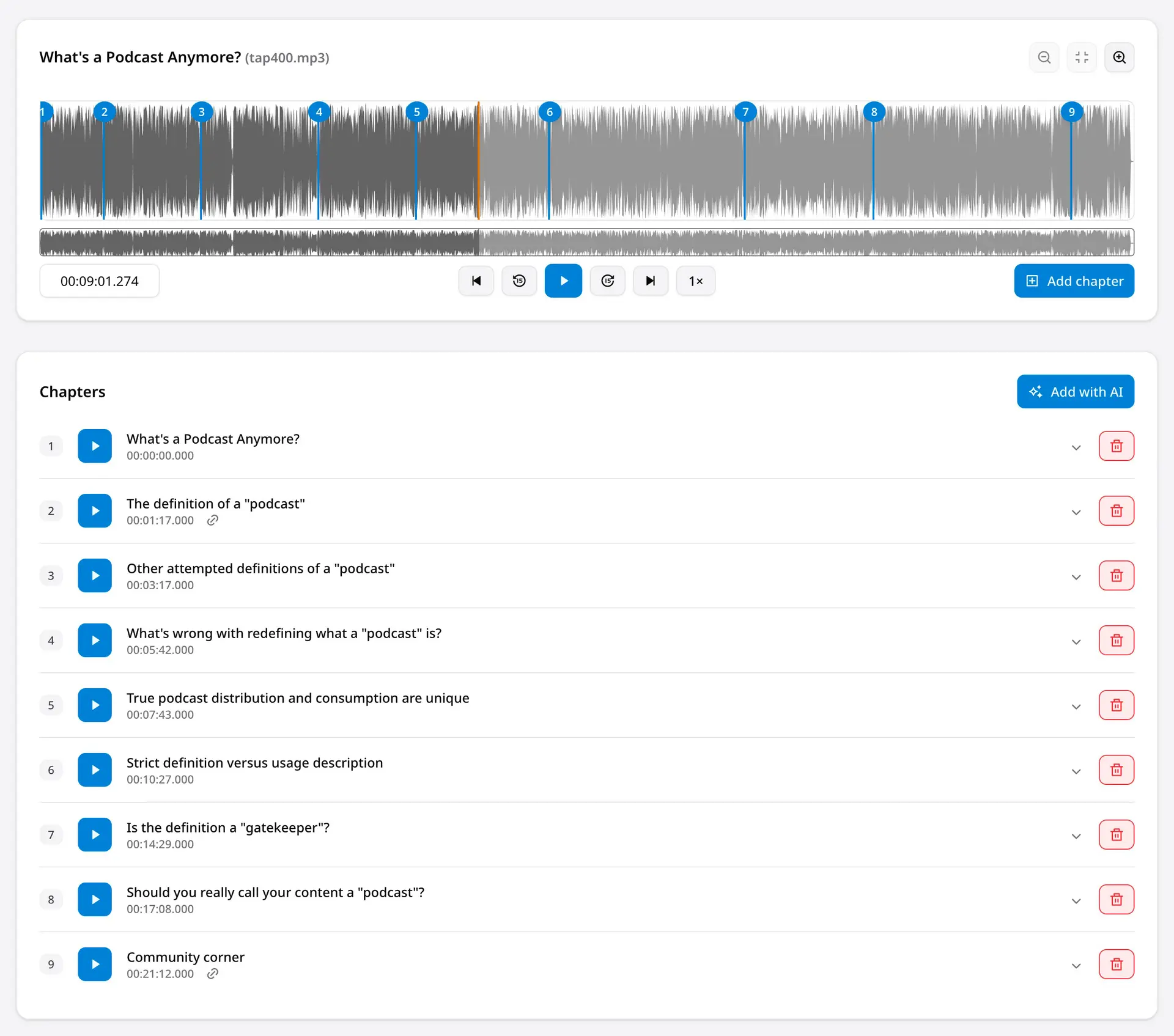
Example workflow of adding and editing podcast chapters to an episode. Photo credit: PodChapters
And if you want something provider-agnostic and potentially with greater features, you can use a dedicated app to add and manage your chapters, such as:
- PodChapters®: This browser-based app was created by this author to be the fastest, easiest, and most feature-rich experience for chaptering podcasts. It supports multiple output formats: MP3, Podcasting 2.0, Podlove Simple Chapters, YouTube timestamps, and more. It offers smart AI features to either suggest chapters or even turn your own outline into chapters for you. And it offers additional features to improve the experience for podcasters, such as transcriptions, chapter-hosting, reusable presets (perfect for multiple podcasts, or even speeding up a single-podcast workflow), automatic UTM parameters for analytics, ID3 tags, and more.
- Podcast Chapters: This macOS-only app exports MP3 and Podcasting 2.0 chapters and offers on-device transcript-generation. It supports ID3 tags and podcast presets (for single- or multi-podcast workflows). Chapters are added manually.
- Auphonic: Although this browser-based app is known primarily for audio-enhancement, it also supports podcast chapters. These chapters can be added manually or suggested by AI.
- Forecast: This free macOS-only app supports only MP3 chapters and basic ID3 tags. Its simple interface and feature set can make it a good entry point for experimenting with legacy chapters.
- Chapterize: Modeled after the simplicity of Forecast, this Apple-only app (macOS, iOS, and iPadOS) can import Podcasting 2.0 chapters but not export them. It offers on-device transcript-generation and a simple interface and feature set.
- Hindenburg: This is an audio-editing app for Windows and macOS that also offers users the ability to transcribe their audio and chapter their episodes while they edit. It supports MP3 chapters and Podcasting 2.0 chapters.
Once you have your chaptering tool selected, the best way to start chaptering your episodes is by turning your outline or segments into separate chapters with appropriate titles.
From there, you can make the chapters as deep and detailed as you want. For example, you might have a single chapter for a “listener feedback” section that also links to your contact method(s) and encompasses all the feedback you share. Alternatively, you could make a chapter for each piece of feedback you share, allowing your audience to see a more detailed outline of what you cover and even optionally using images—if available—to accompany each message.
Unfortunately, because most chaptering tools offer precision only to the second (not the millisecond), you might sometimes have to place a chapter starting point in the middle of a word. In such cases, it’s better to cut off the content right before the chapter than to cut off part of the actual chapter. For example, If your chapter should be between these sentences, “That’s the best way to do it. Number two: upgrading your workflow. ” but your chaptering tool can’t be that precise, it would be better for the chapter to start at “—do it. Number two: upgrading your workflow. ” than at “—ber two: Upgrading your workflow.”
For any link you mention in your episode, consider making a chapter for it that encompasses your conversation about that thing. If you mention several links, such as your guest’s book recommendations, you could either link each recommendation with its own chapter, or link to a page with the list of hyperlinked recommendations. This could even be an anchor link to a specific position on a webpage, using element IDs and a URL with that ID. This is more advanced, but it’s easy to make anchor links in WordPress, and the webpage’s HTML code would look like this:
<h2 id=”resources”>Recommended resources</h2>

<!-- List of resource links here -->
And then your chapter URL would look like https://myawesomepodcast.example.com/episode-title/#resources.
If you use your podcast-hosting provider to create your chapters, then they should host the Podcasting 2.0 JSON chapters for you. For other providers or publishing tools, you will need to either host the JSON file somewhere yourself, or use the chapter-hosting that PodChapters provides.
Although some podcast apps (including Apple Podcasts, Spotify, and Overcast) have started auto-chaptering episodes when no chapters are provided, this means the chapters will be different in different apps and will be more likely to be incorrectly chaptered or missing important elements (like images or URLs). Thus, the best way to ensure your chapters work exactly as you want is to chapter your episodes yourself and to support at least both legacy MP3 chapters and modern Podcasting 2.0 chapters.
A caution with some podcast-hosting providers
Legacy MP3 chapters and modern Podcasting 2.0 chapters have been around and supported by many apps and providers for several years. But some podcast-hosting providers still don’t support podcast chapters. While some legacy providers don’t offer chapter features, they might allow your MP3 chapters to pass through or even allow you to add custom XML code to your RSS feed for linking to Podcasting 2.0 chapters. But other hosting providers reprocess your media in such a way that they strip any chapters and metadata you put in your media file, and they don’t support the Podcasting 2.0 standard for chapters.
In the interest of respect and recognition that some providers improve over time, I will not list the offenders here. But the best place to go to see what podcast apps, publishing tools, and hosting providers do support Podcasting 2.0 chapters is on the official Podcasting 2.0 website.
The future of podcast chapters
While MP3 chapters are the legacy format embedded in the MP3 file, Podcasting 2.0’s externally located chapter data presents new ways of creating and maintaining chapters.
For example, simply by separating the chapters from the media files and RSS feed, a podcaster could update a promotional chapter to reflect the latest coupon code or whether the offer is still available.
The future of chapters is in Podcasting 2.0, and there are multiple proposals to expand chapters beyond the core 3 parts of title, optional image, and optional URL that chapters have supported for years.
Such “Super Chapters” could include:
- Image galleries—browsable at the audience’s pace instead of requiring precise and forced chapter timing
- Rich text—quotations, references, code, audience feedback, lists
- Multiple links—a list of recommended resources or citations
- Interactive forms or polls—feedback forms, short surveys, and simple polls
- Annotations—presenting structured metadata about episode contents
- In-app links to other episodes or podcasts—such links would open the podcast or episode in the same podcast app and without a web browser
The current top proposals for chapter innovations are from Daniel J. Lewis (this author) in the official Podcast Namespace GitHub discussions, and Ryan Williams on PodcastAnnotation.org.
Podcasting 2.0 chapters are also ready for video podcasts because the external JSON chapter format does not have to change for the media format, and it would be linked the same way from the podcast’s RSS feed.
Remember: chapters help everyone in the podcasting ecosystem
By adding chapters to your podcast episodes, you’re making your calls to action easier, which helps you, your audience, and any advertisers; you’re enhancing the podcast metadata, which helps app and platform developers; and you’re improving the consumption experience, which better serves and engages your audience.
And with some chapter tools (such as PodChapters or those offered by your hosting provider), adding these helpful improvements could take as little as a minute or two and yet offer so much more value for your podcast’s most important people: your audience.